文字表示
-
目的
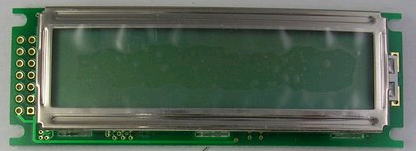
英数カナを16文字、2行まで表示できる液晶モジュール(LCD:Liquid Crystal Display)を利用して、文字表示を行います。ここでは、よく利用されるサンテク社 SC1602 を紹介します。
-
仕様
SC1602は1行16文字で2行まで表示可能です。表示可能な文字は英数字と半角カナで、コードはJISに従います。文字カーソル位置を指定して指定した位置に文字を表示することも可能です。
SC1602BSLB ではバックライトの点灯も可能です(実験で使用するLCD(SC1602BS*B)にはバックライトはありません)。
-
構成
LCDに文字を表示するには、文字コードを液晶モジュール(以下LCD)に送り付けます。LCD側で受け取った文字コードから内蔵の文字パターン ROM を参照し、5*7 のビットパターンを作成し、表示します。
2行の表示が可能ですが、2行目の文字アドレスは先頭が40hとなります。1行目の最後のアドレス0Fhとは連続していません。注意して下さい。
-
LCDの信号線
LCDは以下の信号で接続します。VOはコントラストを設定するアナログ信号で、0Vのとき最大コントラストになります。(可変電源を利用できる場合、LCDの電圧を4.8Vにすると良いコントラストになります)
データ線は4本または8本で使用します。4本の場合、下位と上位の2回に分割してデータを送ります。RSは文字コードとコマンドを区別し、R/W は読み/書きを設定します。E でデータの同期をとります。
ピン番号は、LCDの左側の接続端子の番号で、左下が1、その右が2ピンです。その上の左が3、右が4ピンです。LCD の端子に1ピンが表示されています。ピン 信号名 意味 1 VCC 5V 2 GND GND 3 VO コントラスト 4 RS 1:制御、0:データ 5 R/W 1で読み、0で書き込み 6 E(stb) データ同期用パルス 7-10 BD0-DB3 下位データ 11-14 BD4-BD7 上位データ
-
LCDにデータを送る
LCDには8本のデータ信号が用意されており、この信号線に文字コードを設定し、E(プログラムでは st b)信号にパルスを送ります。LCDはこの信号(E)のたち下がり時に、制御コードや文字コードを受け取ります。8本の信号を接続するのはやっかいなので、4本の信号線で2回に分けてデータを送ることもできます。4ビットモードの場合、上位4ビットのデータ線のみを接続します。
LCDには文字コード以外に、文字位置や表示方法など、表示の制御に関する情報も送る必要があります。このため、RS信号があり、これを1にすると制御コード、0にすると文字コードを送る約束になっています。

実験回路
-
LCDの信号
LCDのVCCを5V(1ピン)を電源+、GND(2ピン)、を電源GNDに接続します。LCDの3ピン(VO)はグランドに接続します。これで、表示のコントラストが最大になります。
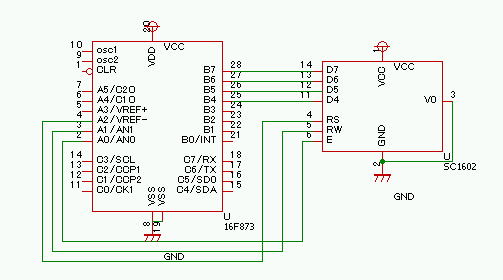
LCDの14-11ピンをPICのポートBの上位バイト(RB7,6,5,4)に接続します。RS、R/W、E、の信号をPICのA0,A1,A2 に接続します。接続する端子はどこでもよいのですが変更した場合プログラムを修正する必要があります)。
-
回路図
PICに16F873を用いる場合、16F873のB7,B6,B5(28,27,26,25)ピン にLCDのD7,D6,D5,D4 を接続してください。A3,A2,A1にLCDのRS,RW,E 端子(4,5,6ピン)を接続します。他に、VCC、GND、Voを接続します。Voは5V-GND間を20kオーム程度の半固定で分圧し4V程度を加えます(Voを直接GNDに接続してもかまいませんが、コントラストが強すぎる場合、100~1kオーム程度の抵抗を直列につなぎます)。
下の回路図では、PICの発振子やCLRの回路が省略されています。端子C0にLED点灯回路を接続すると、プログラムの実行を確認できます。

-
制御端子を変更する
ここでは、lcd のRS,RW,E 端子を、A2,A1,A0 に接続していますが、別の出力端子を利用することもできます。この場合、プログラムの先頭の宣言を、接続した端子の置き換えます。
#define rs PIN_A2 //chip select
#define rw PIN_A1 //read/write
#define stb PIN_A0 //strobe
プログラム
-
LCDライブラリ
ここでは、LCD 用のサブルーティン lcd_lib.c を利用し、文字を表示します。ライブラリでは、以下の関数を利用できます。
lcd_clear(); lcdをクリアする lcd_cmd(cmd) コマンド cmd を送る lcd_data(<文字列>); 文字列を表示する
ライブラリでは、RS、R/W、E の信号を接続するPICの端子を、re,rw,stb にdefineで指定しています。define の指定を変更すれば、別の端子を利用できます。データ信号は、RB7,6,5,4 を利用します。#include で lcd_lib.c を読み込みます。
   #define Bmode 0x0F
   #define rs PIN_A2 //chip select
   #define rw PIN_A1 //read/write
  #define stb PIN_A0 //strobe
  #include <lcd_lib.c> //include lcd library
-
数字を表示する
int型の変数val の値を表示するには、文字配列 buffer[] を用意し、sprintf() でbuffer[]に文字を作成します。
char buffer[20];
sprintf(buffer,"val=%3u",val);
lcd_data(buffer);で lcd に表示をすることができます。%3u は符号なし整数を3桁で表示するフォーマットです。
-
行の指定
第一行と2行は連続していません。第2行に表示をするには、lcd_cmd(0xC0); を、第一行に表示をするには、lcd_cmd(0x80); を表示の前に実行してください。
-
CCS(コンパイラ)の特殊な機能
CCSは関数呼び出しに関して特殊な機能を持っています。文字C を受け取り、ある処理をする関数 fun(char C) を作成した場合、
fun(char c[])
として呼び出すことで、c[] の各要素Cに fun(char C ) の処理を適用します。lcd_lib.c では、lcd_data() を1文字の表示を行う関数として定義しています。文字列への拡張は、CCSコンパイラが自動的に行います。
また、printf() に1文字出力関数を指定することで、printf() を利用した書式を指定した表示が可能です。例えば、int max; long ld; として、
printf(lcd_data,"max=%4u long=%ld",max,ld);
で、液晶に max と ld の値を書式指定して表示できます。ここで、 lcd_data はLCD に1文字を送り出す関数です。%4u は符号なし整数を4桁で表示するC言語標準の書式です。
-
LCD表示
lcd を利用するためには、#include <lcd_lib.c> でライブラリを読み込みます。
//LCD display
//PB4>LCD.11(DB4), PB5> LCD.12, PB6> LCD.13, PB7> LCD.14
//PA0>LCD.6(STB), PA1>LCD.5(RW),PA2>LCD.4(RS)
//LCD.<7:11> GND
//LCD 1>VCC(4.2V)  2> GND  3>GND
//RC0>LED チェック用

//#include <16f648a.h>
//#fuses INTRC_IO,NOWDT,NOLVP,NOMCLR //内部クロック、WDT,LVPなし
//#use delay(CLOCK=4000000)

#include <16f873A.h>//16F873を利用する場合上の3行を以下の3行に置き換えます
#fuses HS,NOWDT,NOLVP //内部クロック、WDT,LVPなし
#use delay(CLOCK=20000000)

#byte port_b = 6  //port Bレジスタのアドレス

//for LCD control
//define port and Pin
#byte db=6
#define Bmode 0x0F
#define rs PIN_A2 //chip select
#define rw PIN_A1 //read/write
#define stb PIN_A0 //strobe
#include <lcd_lib.c> //include lcd library

///////////////////////////////////////////////
// LCD test program
///////////////////////////////////////////////
int max;
long ld;

main(){

 set_tris_a(0xF0); //mode set of port
 set_tris_b(0X0F); //lower is input
 lcd_init();    //initialize LCD

 while(1){
  output_toggle(PIN_C0);//チェック用

  lcd_clear(); //clear display
  lcd_data("Hello");
  delay_ms(1000);  //wait 1sec

  lcd_clear();
  lcd_data("from PIC");//最初の表示
  delay_ms(1000);

  lcd_clear();
  lcd_data("1234567890");//次の表示
  delay_ms(1000);

  lcd_clear();
  lcd_data("abcdefghijklmnop");//2行に分けて表示
  lcd_cmd(0xC0); //第2行に移動
  max=31;ld=12345;
  printf(lcd_data,"max=%3u long=%6ld",max,ld);
  delay_ms(3000);
 }
 return 0;
}
LCDライブラリ
-
lcd_lib.c
lcd_lib.c では、LCD を制御する以下の関数を定義しています。rs,rw,stb などの制御信号はあらかじめ、ピン番号に設定しておく必要があります。
lcd_ready():LCD のステータスを返します。
void lcd_data(int asci):asci の文字コードを表示します。
void cmdout(int cmd):コマンド cmd を送ります。
lcd_clear():画面をクリアします。
void lcd_init():LCDを4ビットモードに初期化します。
///////////////////////////////////////////////
//  LCD control Library
//    lcd_init()-------- initialize
//    lcd_ready()------- busy check
//    lcd_cmd(cmd)------ send command
//    lcd_data(string)-- display string
//    lcd_clear() ------ clear display
///////////////////////////////////

/// lcd ready check function
int lcd_ready(){
   int high,low;
   set_tris_b(Bmode | 0xF0);   //upper is input
   output_low(rs);
   output_high(rw);     //read mode
   output_high(stb);
   high=input_b()&0xF0;    //input upper
   output_low(stb);

   output_high(stb);
   low=input_b() & 0xF0;   //input lower
   output_low(stb);
   set_tris_b(Bmode);
   return(high | (low>>4)); //end check
}

////////// lcd display data function
void lcd_data(int asci){
  //db = asci;        //set upper data
  output_b(asci);
   output_low(rw);            //set write
   output_high(rs);         //set rs high
   output_high(stb);         //strobe
   output_low(stb);

   asci=asci<<4;
  output_b(asci);
   //db = asci;            //set lower data
   output_high(stb);   //strobe
   output_low(stb);
    //delay_ms(10);
   while(bit_test(lcd_ready(),7));
}

////////// lcd command out function
void cmdout(int cmd){
  output_b(cmd);
   output_low(rw);            //set write
   output_low(rs);            //set rs low
   output_high(stb);         //strobe
   output_low(stb);
   cmd=cmd<<4;
    output_b(cmd);
   output_high(stb);         //strobe
   output_low(stb);
}

void lcd_cmd(int cmd){
   cmdout(cmd);
   while(bit_test(lcd_ready(),7)); //end check
}

/////  lcd display clear function
void lcd_clear(){
   lcd_cmd(1);               //initialize command
    delay_ms(100);
}

///////// lcd initialize function
void lcd_incmd(int cmd){
   //db = cmd;               //mode command
  output_b(cmd);
   output_low(rw);            //set write
   output_low(rs);            //set rs low
   output_high(stb);         //strobe
   output_low(stb);
   delay_ms(10);
}

void lcd_init(){
   delay_ms(15);
   lcd_incmd(0x30);         //8bit mode set
   delay_ms(5);
   lcd_incmd(0x30);         //8bit mode set
   delay_ms(5);
   lcd_incmd(0x30);         //8bit mode set
   delay_ms(5);
   lcd_incmd(0x20);         //4bit mode set
   delay_ms(5);

   lcd_cmd(0x2C);            //DL=0 4bit mode
   lcd_cmd(0x08);            //disolay off C=D=B=0
   lcd_cmd(0x0C);            //display on C=D=1 B=0
   lcd_cmd(0x06);            //entry I/D=1 S=0
}
-
コマンドを送る
4ビットモードでコマンドを送るには、まず、output_b(cmd); でポートBにコマンドを送り、rs(コマンド/データ)を0、rw(読み/書き)を0とします。次に、E(stb)信号を1から0に変化させ、LCDに上位4ビットのコマンドを送ります。次に、cmd=cmd<<4;で、cmdを4ビット右シフトして下位4ビットをポートBにセットし、E(stb)信号を1から0に変化させます。これをプログラムすると、次のようになります。
void cmdout(int cmd){
   //db = cmd;               //set upper data
  output_b(cmd);
   output_low(rw);            //set write
   output_low(rs);            //set rs low
   output_high(stb);         //strobe
   output_low(stb);
   cmd=cmd<<4;
    output_b(cmd);
   //db = cmd;               //set lower data
   output_high(stb);         //strobe
   output_low(stb);
}
-
制御コードと初期化
LCDの制御コードは以下の表のようになっています。最初は、8ビット転送モードになっていますが、直前の終了状態により、不確定です。そこで、仕様書には、制御データとして D7-D4 の上位4bitに 0011 を3回送り、確実に8ビットモードに移すよう、求めています。制御コードから上位4ビットが 0011 の場合、8ビットモードへの移行コマンドになります。
このとき、D3-D0 の値は不確定です。続けて、D7-D4の上位4bitに 0010 を送り、4ビットモードに移行します。以下は、8ビットのコードを4ビットづつ2回に分割して転送することになります。DDRAMアドレスで書き込む文字の位置を指定できます。最上位ビットが1のとき、第2行のアドレスになります。下位5ビットで有効なアドレスは0~0xFです、
コマンド 0xC0を送ると、カーソルを2行の先頭文字に移動できます。第一行に表示をするには、lcd_cmd(0x80); を表示の前に実行してください。
0000 0001 クリア 0000 0010 カーソルを先頭に戻す 0000 01ds sが1なら文字入力でカーソルを移動
d=1なら次、0なら前に移動0000 1dcb d=1で表示ON 、c=1でカーソル表示、
b=1で、カーソルの文字をブリンク001D NF00 D=1で8ビット、0で4ビットモード
N=1で1行、0で2行表示
F=1 で5*10ドット、0で5*7ドット表示01aaaaaa CGRAMアドレス 1aaaaaaa DDRAM(文字表示)アドレス
-
初期設定では 0011 を3回送る
ここでは、配線を簡単にするため、4本の信号で接続し、4ビット2回で8ビットのデータを送ることができる4bitモードを利用します。LCDを4bitモードに初期化するのに、制御コード 0011 を3回送る必要があります。理由は、LCDがどんな状態で制御コードを受け取るのか不明だからです。もし、LCDが8ビットモードの場合、3回の 0011**** は8ビットモードへのコマンド3回として受け取られます。
しかし、既に4ビットモードに移行し、2バイト目を待っている状態だとします。最初の 0011は前の制御コードの下位バイトとして受け取られます。次の0011は制御コードの上位バイト、三つ目の0011は下位バイトとして受け取られます。これで、LCDは8ビットモードに移行できます。
4ビットモードに移行済みで、最初の上位バイトを待っている場合では、最初の二つのデータで8ビットモードに移行し、3個目の 0011 は8ビットモードの制御コマンドとして受け取られます。いずれの場合でも、3個の 0011 を送ることで、いったん8ビットモードに移行します。
この状態で、0010を送ると、4ビットモードに移行できます。