グラフィックスで利用されるダブルバッファの手法を紹介します。
- 必要性
ディスプレイは表示・消去、再表示を繰り返します。これを秒当たり数十回繰り返し動画を表現します。しかし、この、消去・表示、の繰り返しは、プログラムの描画とは無関係のため、描画中に消去動作が起こり、これが、「ちらつき」となって現れます。
この現象と、TV画面で別の画面を撮影するとき現れる縞模様とは同じ仕組みで起こります。ディスプレイの周期に合わせて画面を描画することは一般には困難です。
ディスプレイは一般に画像バッファと呼ばれるメモリを走査しながら表示します。そこで、描画はディスプレイとは別のバッファ(メモリ)に作成しておき、このメモリをまとめて、ディスプレイのバッファに送る方法がよく採用されます。
ディスプレイのバッファとは別のバッファを利用するので、ダブルバッファと呼ばれます。
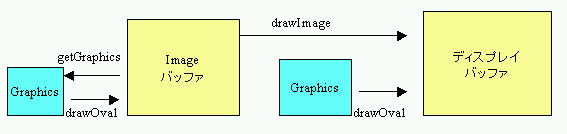
- Imageクラス
二つ目のバッファとして Image クラスのオブジェクトを利用します。image1をオブジェクトとして、
Image image1;
image1 = createImage(getSize().width, getSize().height);
createImage(getSize().width, getSize().height); で、ウインドウのサイズ分の領域を確保します。ここで、getSize() はウインドウのサイズを取得するメソッドで、.width がその幅、.height が高さになります。
- 注意
getSize()はウインドウのサイズですが、これは、init()の時点では確定していない場合があります。したがって、createImage( ) は、アプレットの start() 以後に行う法が安全です。
Jbuilder では、init()の中でgetSize().を行うと 0 を返します。ただし、IE ブラウザでは、getSize().はアプレット起動時の値が返りますから、init() で createImage( ) をしてもかまいません。
- Imageへの描画
Imageから次のように Graphics オブジェクトを取得することができます。
Graphics offgraphics;
offgraphics = image1.getGraphics();
この offgraphics に
offgraphics.fillOval( )
のように、描画をすることができます。この時点ではまだ、画面には現れません。描画内容は Imaeg1 に記録されています。すべての描画が終了したら、
g.drawImage(image1, 0, 0, this);
で、Image1を g の画面に描画します。この速度はかなり高速ですから、この間にディスプレイが消去を行う危険性は軽減されます。
- 確認プログラム
この効果は繰り返し描画をしないと現れません。そこで、スレッドを用います。
Thread thread1;
thread1 = new Thread(this);
thread1.start();
でスレッドを作成し、run()による実行を開始します。ここでは、repaint() と、10m秒 sleep() を繰り返します。
    public void run() {
        while (true) {
            repaint();
            try {
                Thread.sleep(10);
            } catch (InterruptedException e) {
            }
        }
    }
paint()では、loop_index の値を増加させながら、黒の塗りつぶし楕円を描画します。黒の塗りつぶしをすると、背景を白にする消去を見やすくなり、「ちらつき」が観測できます。
チェックボックスをチェックすると、ダブルバッファでの描画を行います。ちらつきが見えなくなります。
- update(Graphics g)の変更
ここで、もう一つ行う作業があります。repaint(); による描画は実は update() を呼び出し、ここで、ウインドウバッファの消去を行っています。画面の消去を防ぐにはこのメソッドを書き換えて、paint() のみの実行とします。
    public void update(Graphics g) {
        paint(g);
    }
ただし、バッファの消去は必要ですから、paint() の中で、
graphics.clearRect(0, 0, getSize().width, getSize().height);
で、バッファをクリアします。
ダブルバッファを利用しない場合、これは不要ですが、update(Graphics g) の書き換えをしてはいけません。
- チェックボックス
ここでは、init()でチェックボックスを作成しています。詳細は別項目を参照して下さい。
if (checkbox.getState()) graphics = offgraphics;
で、チェックを確認し、graphics を切り替えています。また、同じ条件で、最後に、 g.drawImage(image1, 0, 0, this);
を行います。